Private by design
Your key stays on this device. Double Kon has no server of its own, so nothing about what you watch passes through us.
Double Kon dubs the audio of any browser tab into your language in real time, keeping the dub in sync with the original audio. No downloads, no uploads, no waiting. And it’s free.
Works wherever you watch
Open any video, press one button, and hear it in your language as it plays. Double Kon captures the tab’s audio and translates the speech live with a natural voice, while the original sound stays softly in the background.
Add to ChromeChoose from 78 dub languages, each listed under its own name so it’s easy to find. Changed your mind halfway through? Switch the language mid-video and the dub follows without stopping.
Add to ChromeThe dub plays in step with the original audio, with none of the lag that usually comes with live dubbing. You can even fine-tune it yourself to match the original. And the volume of both the dub and the original sound is up to you.
Add to Chrome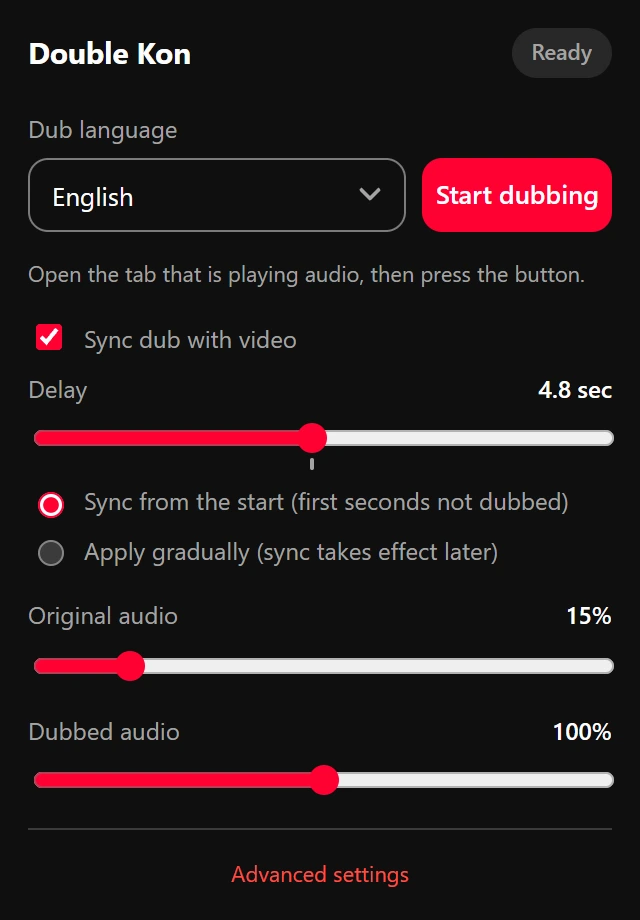
Your key stays on this device. Double Kon has no server of its own, so nothing about what you watch passes through us.
Double Kon runs on your own API key, and it works even on the free tier. Setup takes about a minute.
The extension speaks your language too, right to left or left to right.
Pick a look you like. Every theme follows your system’s light or dark mode.
Step 1
Install it from the Chrome Web Store. It needs nothing else on your computer.
Step 2
A one-time setup. Your key is saved on this device only, and it works even on the free tier.
Step 3
Open the tab that’s playing, click the Double Kon icon, and listen in your language.
Right now dubbing runs on Gemini, connected directly from your browser with your own key. The engine may change or get more options in the future; the way you use Double Kon stays the same.
Installing Double Kon is free. Dubbing uses your own Gemini API key, which you can create for free in Google AI Studio. The free tier has a usage quota set by Google; if you run out, wait a little or use a paid key.
Any tab that plays sound: YouTube, online courses, streams, video calls and ordinary web pages. The only exception is the browser’s own internal pages, where Chrome doesn’t allow audio capture. Syncing the picture with the dub currently works on YouTube only.
Google Chrome 116 or newer on a desktop computer, and an API key. Nothing else to install.
Only on your device. It goes straight from your browser to Gemini, with no server in between. Double Kon never sees it, and it is never written to any log.
You can dub into 78 languages. The extension’s own interface is available in 13 languages, including right-to-left ones.
The Gemini API isn’t offered in every country. If you see this message, the connection has to go through a supported country for the whole session, not just when you save the key.
Yes, but quieter. The original sound drops to 15% by default so the dub is clear, and you can change both volumes at any time, even while dubbing.
Translation always takes a moment. Turn on “Sync dub with video” and Double Kon delays the picture by the same amount, so voice and lips line up again.
A question, an idea or a bug? Write to us and we’ll get back to you.
Double Kon is free. If you’d like, you can support its upkeep and development.